
I am not an AI guy. I am a systems guy. I have spent the last decade helping business owners get the how-to out of their heads and into systems so the business can run without them. So when I tell you Claude Code changed how I run my business, it is not hype. It is the first time a tool has actually done the work, instead of just talking about it.
A few weeks ago I asked it a question I had been putting off for months: which of my marketing actually makes money? It pulled from my calendar, my CRM, my payment system and my analytics, and handed me the answer in about ten minutes. Work that used to take a data analyst three days. That was the moment I sat up.
This is a guide for the owner, not the coder. If you can describe how your business works, you can do this. Let me show you what Claude Code for small business really looks like, why it goes further than ChatGPT or the free plugin, and where to start.
What is Claude Code, really?
Most people meet AI as a chatbot. You ask a question, it gives you a clever answer, and you still do all the work. Claude Code is a different animal.
You describe what you want in plain English, and it goes and does it. It can read your files, write to your systems, pull data from the tools you already use, and chain a dozen steps together without you touching a line of code. The chat talks. Claude Code works.
Here is the shift that matters. For the first time in business history, you can do things faster, cheaper and better all at once. You used to only get to pick two. Want it faster and cheaper? Quality suffered. Want it better and faster? It cost you. AI is quietly rewriting that rule, and Claude Code is the sharpest example of it I have used.
For a business owner, that means the gap between having an idea and having it built has shrunk to almost nothing. A while back I thought, wouldn't it be handy to have a dashboard of every subscription we pay for, which card each one is on, and when it renews. I asked. About thirty minutes later, it was done. Founders are big-picture people. We have never been short of ideas. The struggle was always going from idea to done. That gap is closing fast.
How is Claude Code different from ChatGPT?
This is the comparison everyone searches, so let me be fair about it. ChatGPT is excellent. Many businesses land on a both-tools setup, and there is nothing wrong with that.
But there is a real difference, and it is not about which model is smarter this month. ChatGPT mostly answers. You copy, you paste, you go and do the thing. Claude Code is built to take on the whole job. You point it at your business, and it reads, decides and acts.
Think about the old world of automation for a second. Traditional automation is like a train that only runs on its tracks. It follows your steps exactly, which is great, until something small changes. A button moves. A form field shifts. The whole thing stops.
AI is more like an adaptive problem solver. When it hits something unexpected, it does not break. It looks at what is in front of it, works out the best way forward, and keeps going. That is why Claude Code can handle the messy, judgement-heavy work that rigid automation never could: reading a report, drafting the reply, deciding the next step.
So the honest answer to Claude Code vs ChatGPT is this. Use ChatGPT for quick answers, images and research. Reach for Claude Code when you want the work actually done inside your business. The two are not really competing. One talks, the other runs. And if all you need right now is help writing procedures, a dedicated AI SOP generator may be the simpler place to start.
Isn't Anthropic's "Claude for Small Business" plugin enough?
In May 2026 Anthropic launched Claude for Small Business. It is good. It is a toggle install that drops Claude into tools you already use, QuickBooks, PayPal, HubSpot, Canva, Docusign, Google Workspace and Microsoft 365, with a set of pre-built workflows and connectors ready to go. If you have not tried it, try it. It is free and it is a fine front door.
But here is the honest limitation. It is generic skills on generic apps. It knows how QuickBooks works. It does not know how your business works. It does not know your Critical Client Flow, your pricing rules, your definition of a good lead, the way you like a proposal written, or the five steps your team always forgets. So most owners install it, poke around, get a few tidy wins, and never put it to real work. Not because the tool is weak. Because it does not know them.
That is the gap this whole guide is about. The plugin is the horsepower. What is missing is the road, the map and the destination.
Why a tool with no systems underneath is just faster chaos
Here is the part almost nobody teaches, and it is the part that took me a decade and a hundred thousand books to work out.
The businesses winning with AI did not buy a better tool. They got their systems right first, then plugged AI in on top. The reason is simple. AI is only as smart as what it can see. Feed it a clear picture of how your business runs, and it stops guessing. Feed it nothing, and you have just made your chaos run faster.
I noticed this in myself. When I first got obsessed with Claude Code, do you know the first thing I did? SEO. I told it to crawl my site and pull the title tags, because that is what I know. We all default to our own corner. The businesses that break out of that corner are the ones with systems, because the systems tell the AI where to point.
There is a lovely overlap here that I wrote about in Systems Champion. A prompt is really a system. It is a series of steps you use to instruct the AI to get a repeatable result. And a system, in the SYSTEMology world, is a series of steps that gets a repeatable result from a person. Same muscle. Which is why the person who ends up running your AI is usually the same person running your systems. Your Systems Champion becomes your AI Champion. The two were always going to be one job.
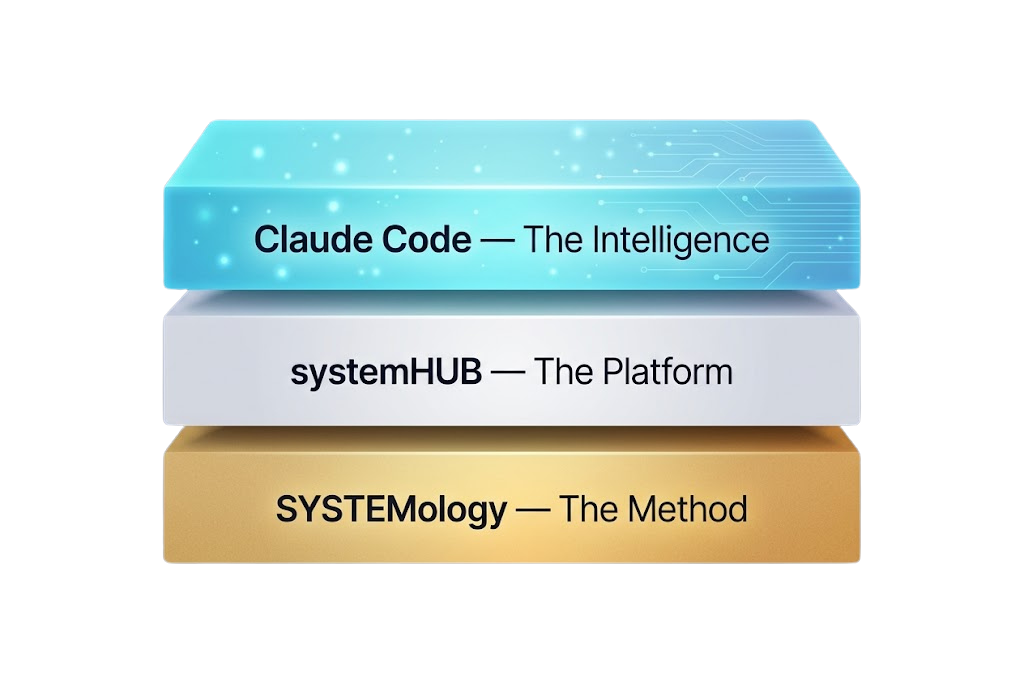
Think of it as a stack. SYSTEMology is the method, getting the knowledge out of people's heads. A platform like systemHUB is where those systems live. Claude Code is the AI that reads it all and does the work. Skip the bottom two and the AI has nothing to stand on.
How do you actually connect Claude Code to your business?
This is where it gets practical. Connecting AI to your business sounds technical. It is mostly just plugs.
Picture the back of a caravan, that fat plug with a dozen little prongs, each one doing a job: lights, brakes, power. Connecting a tool to Claude works the same way. There are a few different plug types, and you go easiest first.
- Native connectors. The ones built straight into the Claude app. Pre-approved, common tools. Claude walks you through it. Start here.
- MCP. Think of MCP as the USB-C of AI connections. It is becoming the standard plug. Good software now ships an MCP "server" that hands Claude a whole set of ready-made actions. systemHUB has one, so Claude can create, edit and organise your systems directly. If a tool you love has an MCP, connecting is easy.
- API. The old reliable. You log into the tool, generate a token (just a key that says "this connection is approved"), and paste it in. Slightly more manual, works with almost everything.
- Zapier and browser control. For the stubborn tools with no proper API. Zapier can bridge the gap. And as a last resort, Claude can drive a browser like a human, clicking around a site. It is the least reliable, so save it for the tools that leave you no choice.
Where do you start? Not by connecting everything. Start with one challenge. Map what happens before, during and after it, then ask: what tools does it need to see to solve this? Connect those. Then work outward along your Critical Client Flow. Attention (your ads and analytics), enquiry (your CRM), delivery, finance, one at a time.
And connect with intention. Wire up your SOPs, calendar, project management and analytics freely. Be thoughtful with customer and proprietary data. Do not hand over banking logins. You stay in control of what it sees, and you can tune how much freedom it has, exactly like a staff member. Under five hundred dollars, just do it. Over five hundred, come and ask me. You can give Claude the same kind of rule.
What can it really automate?
Let me show you the one that still makes owners' jaws drop, because it is real and I ran it live.
I run a webinar a couple of times a month. Normally, understanding how one went is days of grunt work: pull the Zoom attendance, the HubSpot email stats, the landing-page numbers, the Wistia watch-time, the Stripe sales, then stitch it all together and go looking for what worked. So I asked Claude to just do it. Pull the live data from every source and hand me the whole story.
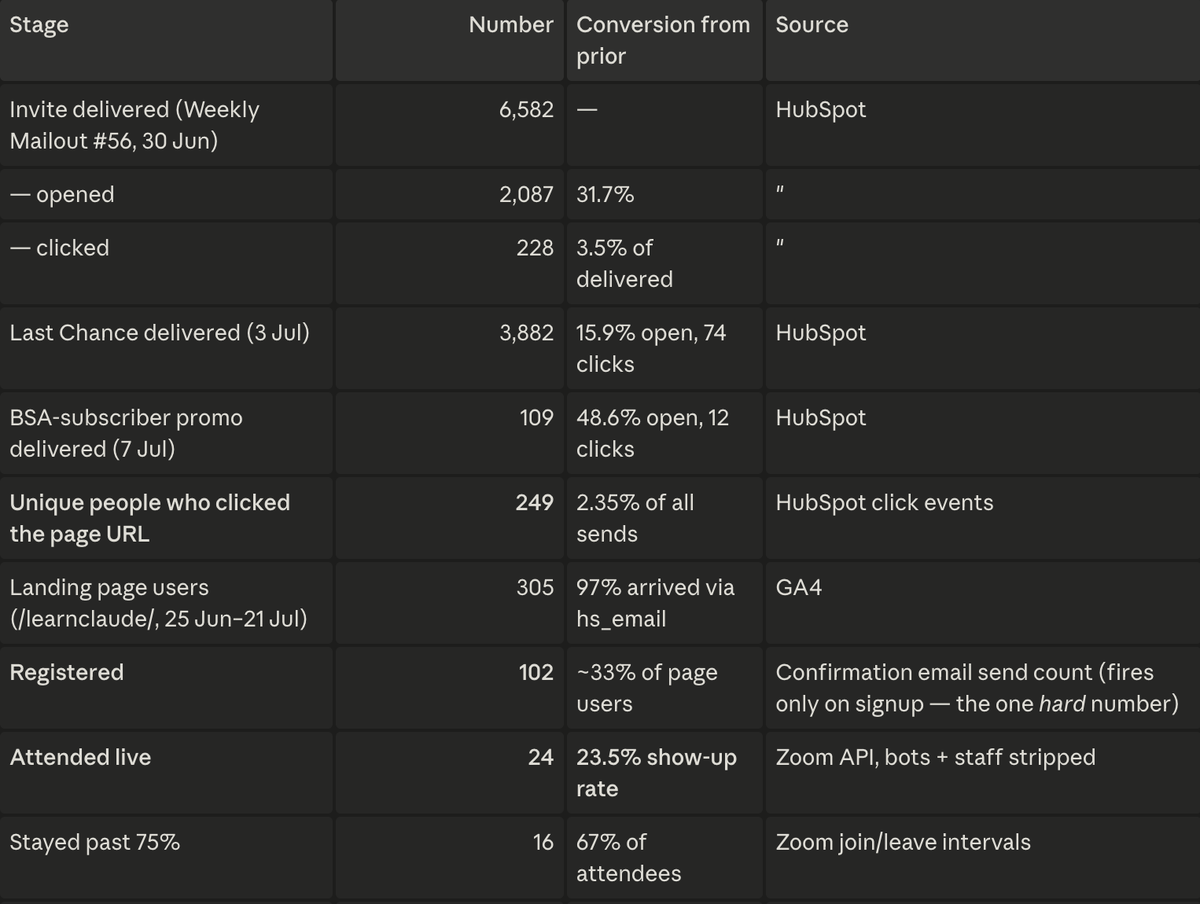
Ten minutes later I had it. Thousands of emails sent, a hundred and two registered, twenty-four showed up, sixteen stayed past the three-quarter mark, and a sale in the room. Not just the numbers. The head-count minute by minute, where people dropped off, what worked, and specific things to fix next time.
That used to be a job for a company big enough to employ a data analyst. Here is why it worked. All that data normally sits isolated, in six different tools, and the only thing connecting it is you, the owner, trying to hold it in your head. Claude became the glue. It brought everything together, stacked it up, and found the patterns a human staring at six dashboards never could.
That is the difference between a chatbot and AI plugged into your business.
Shannon Smit runs SMART Business Solutions, an accounting and financial-planning firm with a 20-plus team. She went process-first, then layered AI on top, and took the admin from around a thousand hours a month down to eight. The full story is here: Shannon Smit case study. The pattern is the point. Systems first, AI second, and the AI has something worth standing on.
Do you need to be technical?
No. If you can describe how your business works, you can do this. It is built for owners, not developers.
The best way I have found to think about it is Iron Man. Claude Code is your Jarvis. A copilot that runs alongside you, does the heavy lifting, and gives you intelligent suggestions. In our training, people name theirs. When the team's AIs start talking to each other and leaving each other notes, it is genuinely one of the more delightful things I have seen in business.
The skill you are actually building is not technical. It is the habit of talking to it. Opening a chat, dumping the messy version of the problem, and letting it help you shape the answer. Go slow to go fast. Get the foundations right, and the speed comes later.
Where to start
You do not need to boil the ocean. Here is the honest first move.
Pick one challenge that eats your week. Open Claude, and just talk it out: what happens before, during and after, where it breaks, what you wish it did. Connect the one or two tools that challenge touches. Then keep feeding it. The picture gets clearer, the wins get bigger, and one day you realise it is running work you used to do by hand.
The tool is the same for everyone. The difference is what you feed it. That is the whole game, and it is why the owners who systemise first are the ones pulling ahead. The question is not whether AI will change your industry. It is whether you will be the Netflix or the Blockbuster of it.
If you want to be walked through the whole thing, foundations, connections, skills and automations, in plain English and built for owners rather than coders, that is exactly what we teach. Have a look at the Claude Code training. No coding, no jargon, just the system that makes the tool actually run your business.